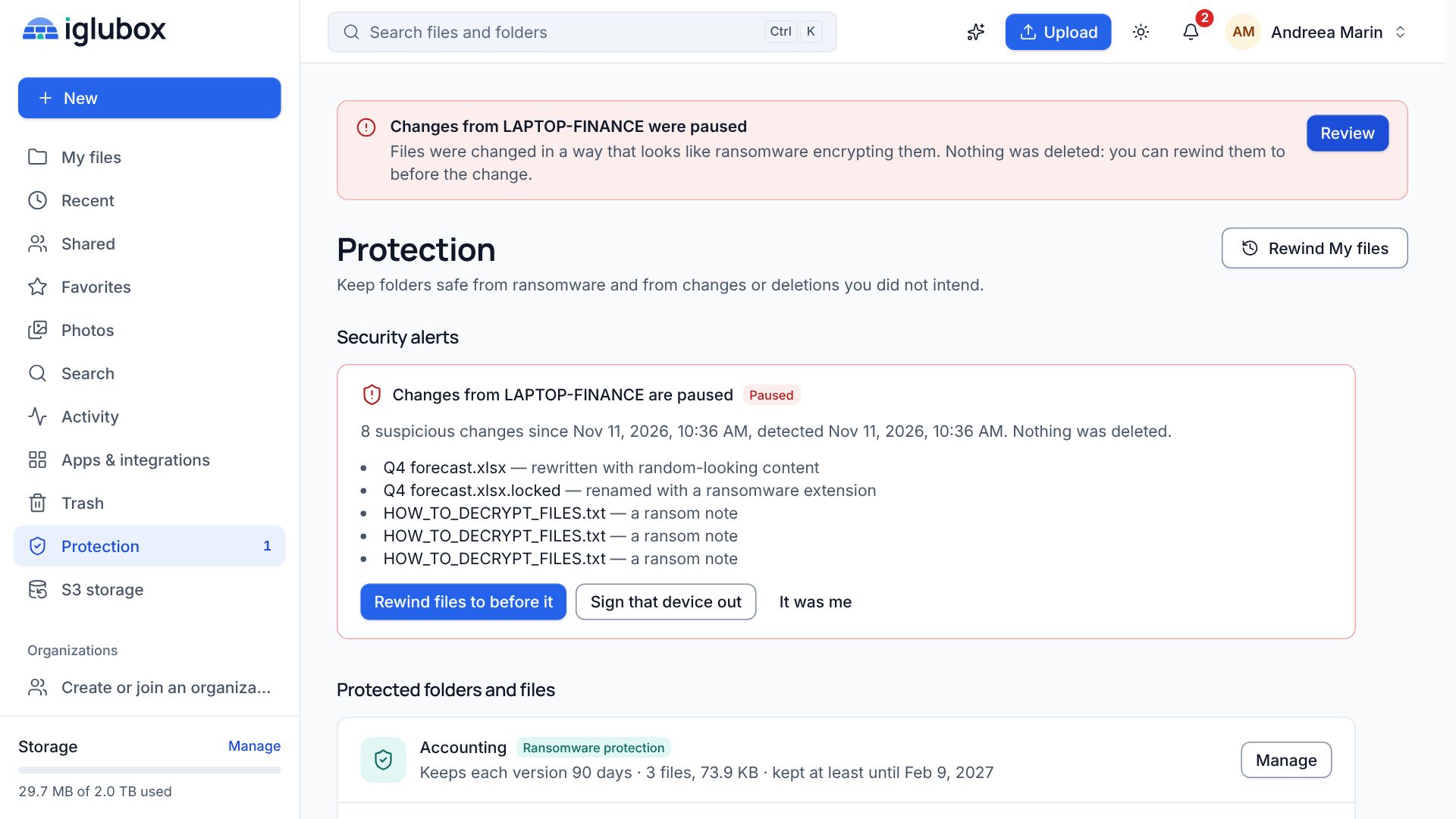
What happens when ransomware reaches your synced folder
What Iglubox notices when an infected laptop starts encrypting files, what it stops, and how Rewind puts everything back.
Cloud storage with an AI assistant
Ask your documents questions and get answers with the page they come from. Find files by what they say. Protect folders from ransomware and keep immutable backups for Veeam, Veritas and other S3 tools — all encrypted, in one account.
Why Iglubox
Iglubox stores, syncs and shares like a cloud drive should. It also reads your documents with you, stands between ransomware and your history, and takes in the backups of your servers.
Ask a contract, a report or a spreadsheet a question and get the answer with the page it comes from. Find files by what they say, and have documents written for you.
The AI assistantProtected folders keep every version and every deleted file. Changes that look like encryption pause the device that makes them, and Rewind puts the files back.
How protection worksAn S3-compatible endpoint with Object Lock: Veeam, Veritas Backup Exec and NetBackup, rclone or the AWS CLI keep immutable copies in your buckets.
IntegrationsThe web app in any browser, apps for Windows and Linux that sync and back up your folders, and an Android app that backs up your photos.
Get the appsAI assistant
Open a file — or pick up to five — and ask what you want to know. The assistant reads the passages that matter and answers with numbered citations: click one and the document opens at that page. Your files are never used to train models, and you can switch the assistant off at any time. AI credits are included every month in Business.
Protection
Iglubox watches for what ransomware does: ransom notes, the extensions it leaves behind, files rewritten with random-looking content. When a computer or phone crosses the line, its changes are paused and you get an alert. Rewind then puts the files back the way they were just before the first suspicious change.
S3 storage
Your account is also S3-compatible object storage. Point Veeam Backup & Replication, Veritas Backup Exec or NetBackup, rclone or the AWS CLI at a bucket, and keep copies of your backups that nobody can delete or encrypt before their date. S3 storage is included in Pro and Business, with retention of up to 10 years.
Sharing
Send a read-only link, or share with specific people and teams as viewers or editors. Cap the number of downloads on any link and switch it off the moment you no longer want it open. Passwords and expiry dates are included with Pro and Business.
Every day
The parts you use without thinking about them.
Large files travel in pieces and pick up where they stopped. Every stored file carries a SHA-256 fingerprint that is checked again over time.
Saving a changed file keeps the earlier version, and deleted files wait in the trash. Versions are kept from 30 days on Free to 1 year on Business.
Spreadsheets and documents open in full editors, and PDFs can be annotated, filled in, signed and rearranged. Every save is a new version.
Photos and videos are arranged by the date and place the camera recorded, duplicates are found, and trips become albums.
Search by name across every folder, or by meaning when the assistant has indexed your files.
Invite colleagues, group them into teams and share folders with a whole team as viewers or editors.
Apps
The web app works in any modern browser. Desktop and mobile apps are listed with their real status, and their installers appear on the download page when they are published.
Upload, organise, preview, edit and share from any modern browser — with the AI assistant, Photos and the S3 storage page.
Syncs your folders in both directions, backs up the folders of your PC, and works quietly from the system tray.
The same app for Linux: two-way sync, computer backup and the system tray, as .deb and .rpm packages.
Your files on your phone: browse, preview and share them, back up your photos automatically and keep files available offline.
Browse, upload and share your files, back up your photos and keep files available offline.
Security
The details are written down plainly, including what we do not do.
How your files are protectedFiles are sealed with AES-256-GCM before they are written to disk or object storage, and travel over TLS.
Passwords are hashed with Argon2id, two-factor authentication is available, and you can review and sign out your connected devices.
Every shared link can be disabled at any time, and download limits stop a link from being passed around forever.
From the blog
Step-by-step setups, and what is new.
What Iglubox notices when an infected laptop starts encrypting files, what it stops, and how Rewind puts everything back.
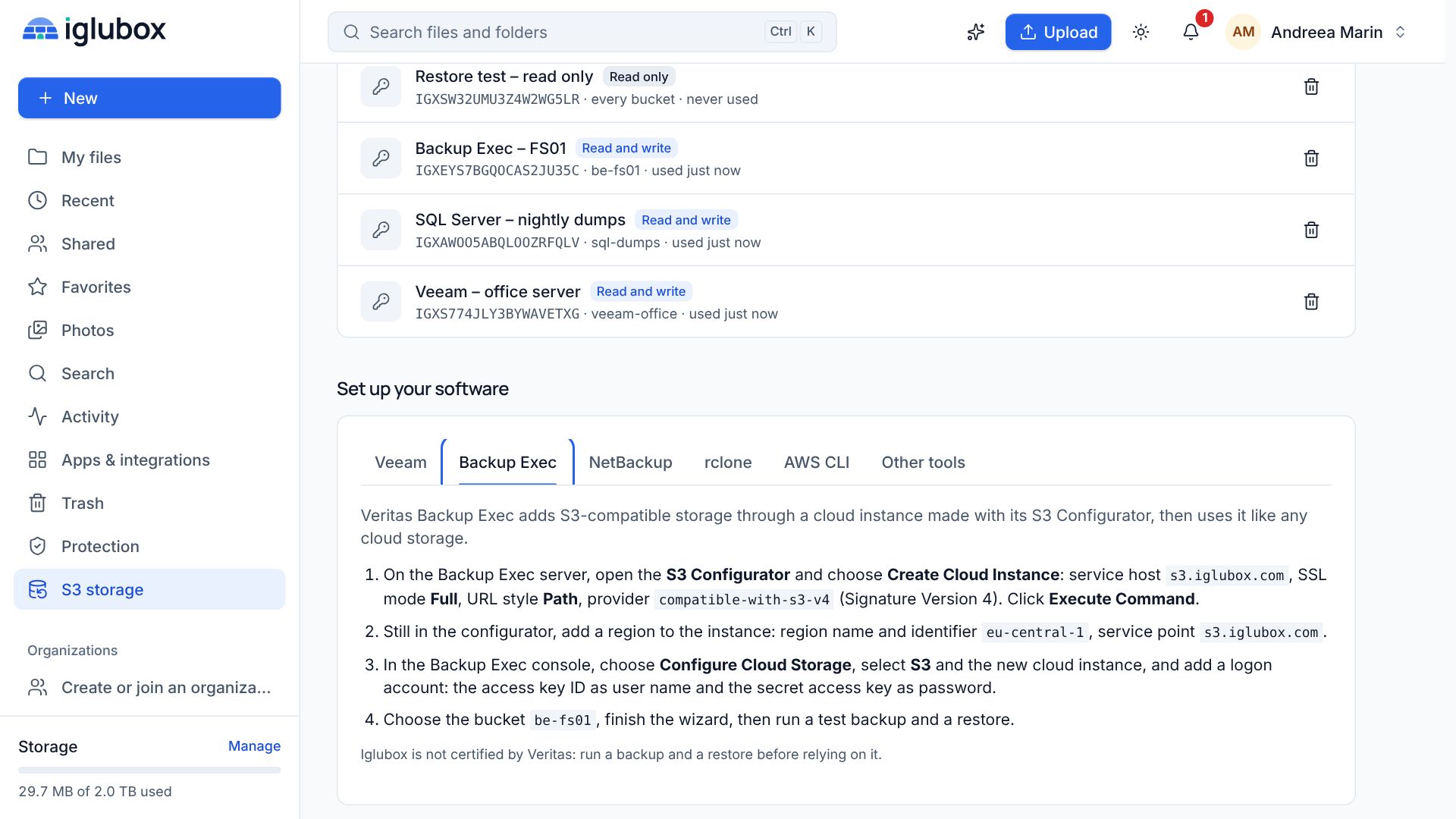
How to point Veritas Backup Exec and NetBackup at an Iglubox bucket: a cloud instance with Signature Version 4, an access key per server, and what to check before you rely on it.
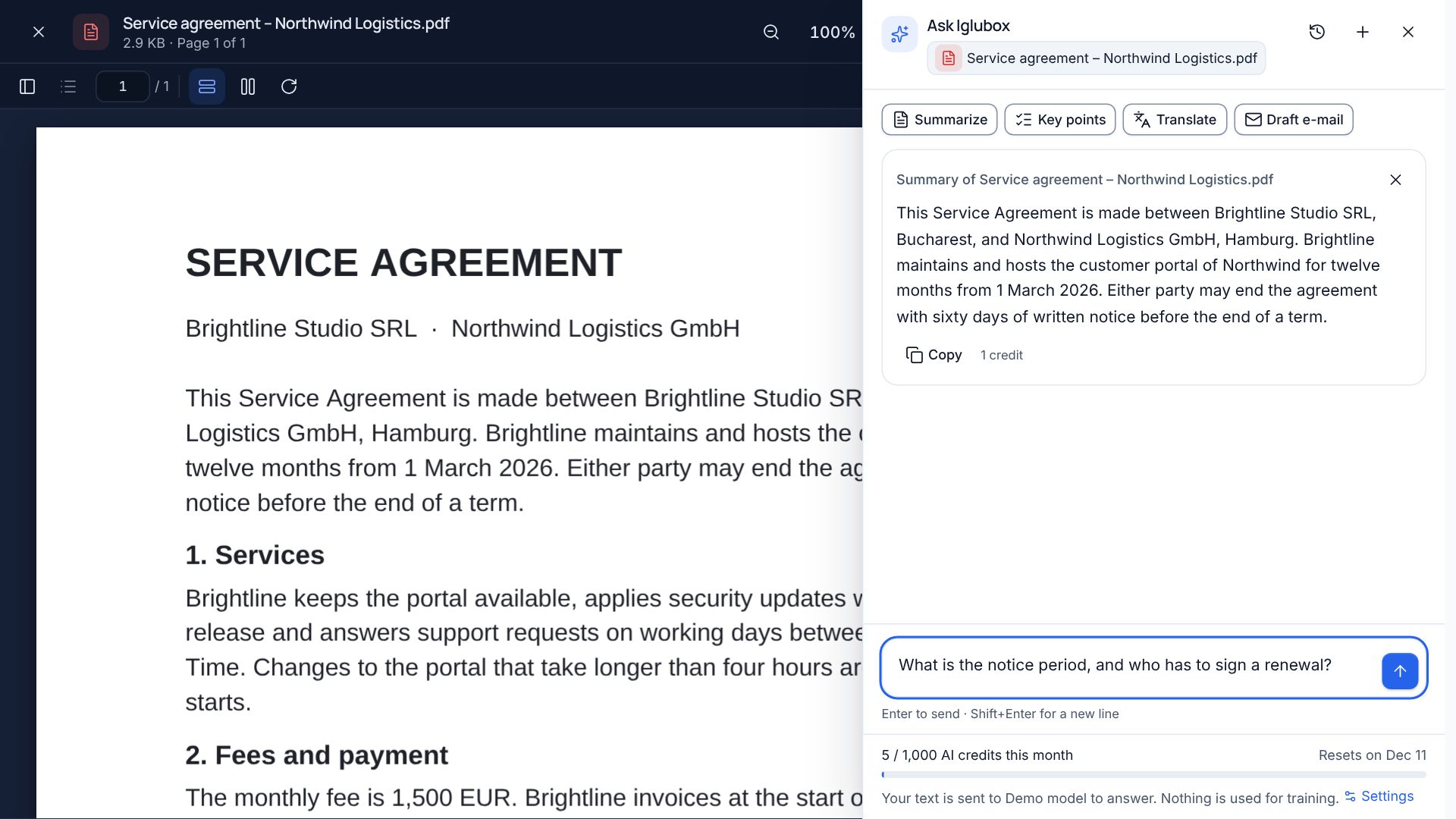
The assistant in Iglubox reads the passages that matter and answers with numbered citations. Click one and the document opens at that page.
Pricing
Begin with a free account and move to a larger plan whenever you need the room.
Create a free account and get 5 GB of storage to start with.