Everyone has a folder of documents they only open when they need one sentence from them: the notice period in a lease, the payment terms of a supplier, the warranty conditions of a machine bought four years ago. Finding that sentence means opening the file, guessing a search word and reading around every hit.
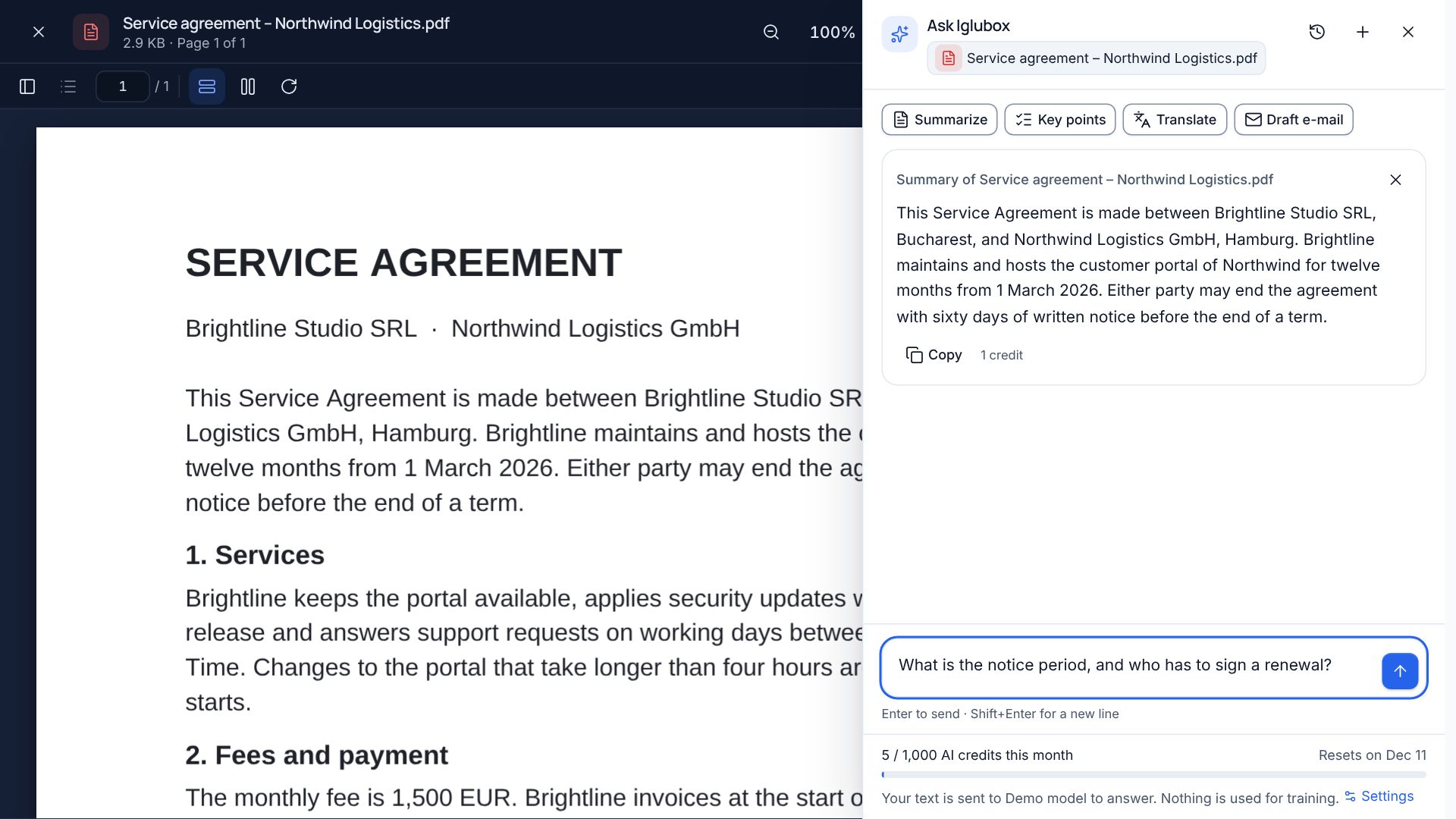
The assistant in Iglubox does the reading. Open a file, click Ask AI (or press Ctrl+J) and ask the way you would ask a colleague: What is the notice period, and who has to sign a renewal?
Every answer shows its sources
An answer from a language model is only useful if you can check it. So the assistant does not answer from memory. It looks up the passages of your file that matter for the question, answers from those, and attaches numbered citations. Click a citation and the document opens at that page, where you can read the original sentence in its context.
If a file cannot be read, because it is damaged for example, the assistant says so instead of guessing, and nothing is charged. You can also pick up to five files and ask about all of them at once, such as two versions of the same contract.
Quick actions
Some requests come up so often that they have a button:
- Summarize: a short or a long summary; Key points gives the main points as a list
- Translate: the whole document, into any language you name
- Draft e-mail about the file, in the tone you choose, ready to copy
Search by what a file says
File names are rarely what you remember. Switch the search to Meaning and type what you are looking for, such as the invoice for the roof repair, and the files that talk about it come up even when “roof” is nowhere in their names. Your files are indexed privately for your account; if they are not indexed yet, start it from Settings → AI & privacy.
Documents written for you
New → Document with AI or Spreadsheet with AI turns a description into a first draft: a meeting report, a letter, a budget with working formulas. The result is a real .docx or .xlsx file that opens in the editors, where you change whatever you like.
What happens to your data
- Your files are never used to train models. Only the passages needed for your question are sent to the AI provider, which is bound by contract not to train on them either.
- You see who answers. The panel names the provider before you ask.
- You can switch it off for your account in Settings → AI & privacy, and an organization can switch it off for all its members.
- Nothing is sent for public links. Opening a file through a shared link never involves the assistant.
Credits instead of surprises
Each plan includes a monthly allowance of AI credits, and one credit is about 1,000 tokens of text. The panel shows what is left. When the credits are used up, the assistant pauses until the next month or an upgrade. No bill grows in the background.
Still check what matters
A citation tells you where an answer comes from; it does not make the answer infallible. For anything important, such as a legal deadline or an amount to pay, click the citation and read the sentence yourself. It takes seconds, and it is the reason the citations are there.